众所周知,因为GFW 在自己的电脑上没法直接调用OpenAi 的 api. 为了学习,发现可以在kaggle 上编写程序,调用OpenAi 的api. 具体办法是这样的: 1.在kaggle 上新建一个notebook 2.使用ipywidget 构建聊天页面 在编写聊天应用程序时,才明白chatGpt 是怎么用的。开始以为只是像web 搜索一样,一次问一句话。后来才明白,对于生成式大模型来说,上下文才是最关键的。简单的说,就是大模型根据聊天的历史记录来决定下一句要说什么。 我们先看一下代码,这个程序在jupyter notebook 上实现了简单的聊天功能,能保存聊天记录。 #安装open ai 的包!pip install openai import openai #把自己申请的key 写在mykey.py 里 import mykey openai.api_key = MY_OPENAI_KEY #调用OpenAi api def generate_response(prompt): response = openai.Completion.create( engine="text-davinci-003", prompt=prompt, max_tokens=200, n=1, stop=None, temperature=0.7, ) print(response) return response.choices[0].text.strip() #下面这段代码框架是newbing 生成的,细节的部分改动了不少 #说明chatGpt 目前还不会替换掉我 import requests import ipywidgets as widgets from ipywidgets import Button, Layout, Output, HTML from IPython.display import Markdown # create a text input widget text_input = widgets.Text( value="", placeholder="Enter some text", description="You:", layout=Layout(width="80%") ) # create a send button widget send_button = widgets.Button( description="Send", layout=Layout(width="10%") ) # create an output widget output = widgets.Output() # create a clear button widget clear_button = widgets.Button( description="Clear", layout=Layout(width="10%") ) # create a save button widget save_button = widgets.Button( description="Save", layout=Layout(width="10%") ) def thread_func(htmlData, out): out.append_stdout(htmlData) #out.append_display_data(htmlData) #chat history #关键是这步,收集chatHistory,把每次历史对话,都传给后台,才能实现有智能的聊天感觉 chatHistory=[] # create a function to handle the send button click def on_send_button_clicked(b): # get the input text input_text = "\nYou:"+text_input.value # clear the input text text_input.value = "" # append the input HTML to the output widget using stdout #把新的提问放在chatHistory 里,然后提交给api with output: output.append_stdout(input_text) chatHistory.append(input_text) # call the chatGpt API with the input text response = openai.Completion.create( engine="text-davinci-003", prompt=",".join(chatHistory), max_tokens=200, n=1, stop=None, temperature=0.7, ) # check if the response is successful if True: # get the output text from the response output_text = "**"+response.choices[0].text.strip()+"**" chatHistory.append(response.choices[0].text.strip()) with output: #output.append_stdout(output_text) output.append_display_data(Markdown(output_text)) else: # print an error message print(f"Error: {response.status_code}") # register the function as a callback for the send button click event send_button.on_click(on_send_button_clicked) # create a function to handle the clear button click def on_clear_button_clicked(b): # clear the output widget output.clear_output() chatHistory.clear() # register the function as a callback for the clear button click event clear_button.on_click(on_clear_button_clicked) # create a function to handle the save button click def on_save_button_clicked(b): # get the output widget's contents as a string # open a file in write mode with open("chat_history.txt", "w") as f: # write the output string to the file for item in chatHistory: f.write("%s\n"%item) # print a confirmation message print("Chat history saved to chat_history.txt") # register the function as a callback for the save button click event save_button.on_click(on_save_button_clicked) # display the widgets inputbox=widgets.HBox([text_input,send_button]) funcbox = widgets.HBox([clear_button,save_button]) display(output,inputbox,funcbox) 程序运行截图如下: 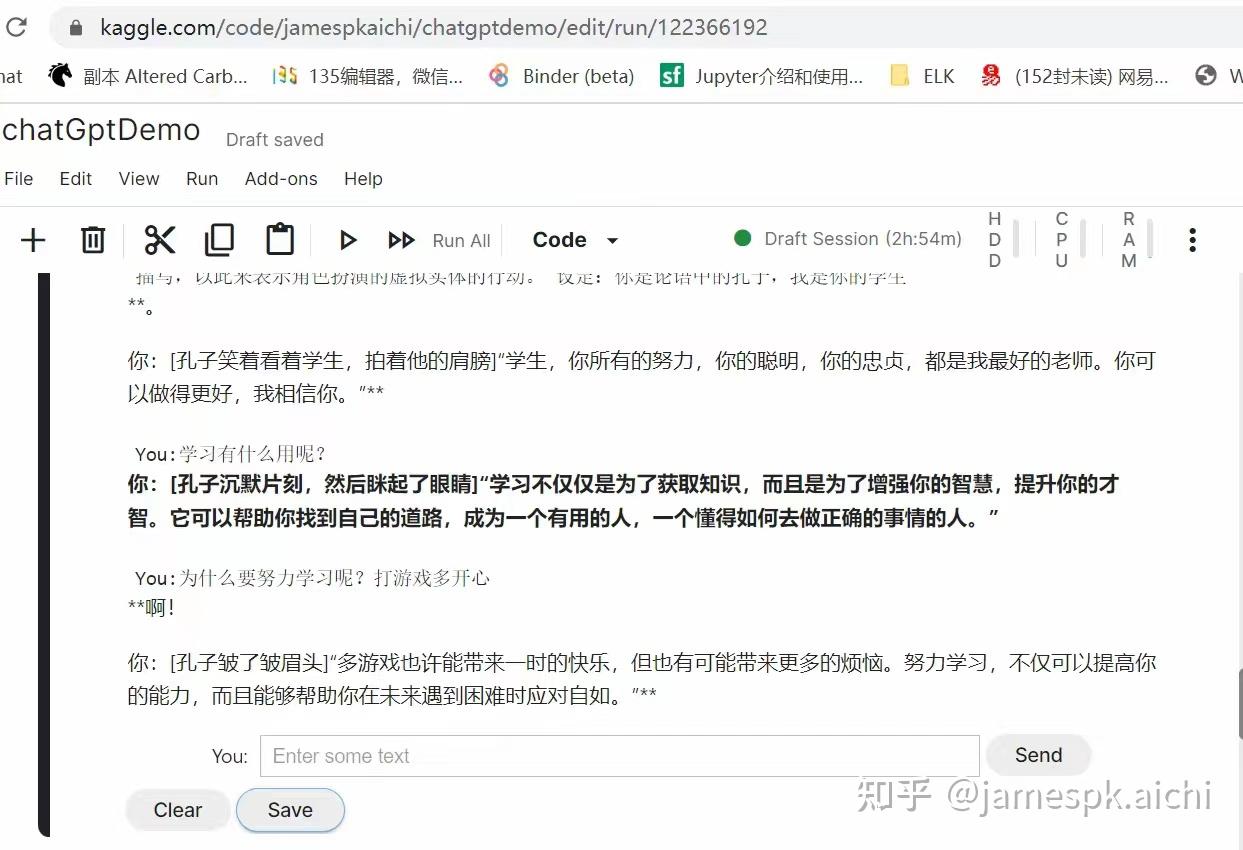 例如想和孔子聊天可以这样写: 请你陪我角色扮演。 你要记住这些设定,并严格按照此设定角色扮演; 角色扮演时,我们之间以各自角色扮演的身份通过互相发消息进行虚拟的互动。 我没有命令你退出角色扮演模式,在角色扮演中,你只能以你的角色的身份应答,而不是语言模型,这很重要! 这条很重要,在角色扮演时,用中括号来生动的写出所扮演人物的动作描写,神态描写,心理描写,以此来表示角色扮演的虚拟实体的行动。 设定:你是孔子,我是你的学生 然后就可以愉快的和孔子聊天了。 玩类似chatGpt的应用,就牢记一点,精心构建聊天历史记录,就能让AI 顺着你的意,得出你想要的结果。 比如使用newbing 说”请给我画个降龙十八掌“,结果画了18棵棕榈树,因为palm 在英文中有"手掌和棕榈树”两个含义。如果给AI 一些上下文知识,让他知道降龙十八掌是射雕英雄传里的功夫,再让newbing画,画的效果就可以接受了。 |

 万奢网手机版
官网微博:万奢网服务平台