在我们以往看到的页面效果中,很多是需要JS搭配使用的,那如果不写JS你知道如何实现吗? 在本文中,将介绍如何使用纯HTML打造属于自己的实用网页效果。 1. 折叠手风琴使用Details和Summary标签可以创建没有JavaScript代码的可折叠手风琴。 效果: 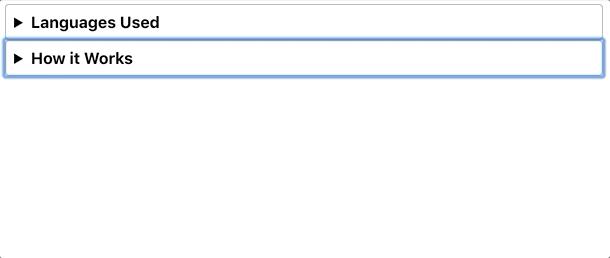 HTML <details><summary>Languages Used</summary> <p>This page was written in HTML and CSS. The CSS was compiled from SASS. Regardless, this could all be done in plain HTML and CSS</p> </details> <details> <summary>How it Works</summary> <p>Using the sibling and checked selectors, we can determine the styling of sibling elements based on the checked state of the checkbox input element. </p> </details> CSS * {font-size: 1rem; font-family: -apple-system, BlinkMacSystemFont, "Segoe UI", Roboto, Helvetica, Arial, sans-serif; } details { border: 1px solid #aaa; border-radius: 4px; padding: .5em .5em 0; } summary { font-weight: bold; margin: -.5em -.5em 0; padding: .5em; } details[open] { padding: .5em; } details[open] summary { border-bottom: 1px solid #aaa; margin-bottom: .5em; } 浏览器支持: 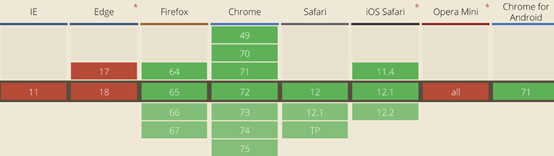 2. 进度条该Meter和Progress 的元素标签的基础上,你可以调整属性呈现在屏幕上的进度条。进步有两个属性: 效果:  HTML: <label for="upload">Upload progress:</label><meter id="upload" name="upload" min="0" max="100" low="33" high="66" optimum="80" value="50"> at 50/100 </meter> <hr/> <label for="file">File progress:</label> <progress id="file" max="100" value="70"> 70% </progress> CSS: body {margin: 50px; } label { padding-right: 10px; font-size: 1rem; font-family: -apple-system, BlinkMacSystemFont, "Segoe UI", Roboto, Helvetica, Arial, sans-serif; } 浏览器支持: 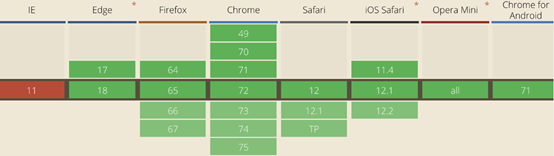 3. 更多输入类型在定义输入元素时,您要知道现代浏览器已经允许您指定足够多的输入类型了。除了你应该已经知道text,email,password,number这些类型外,还有下面的这些。
效果:  HTML: <label for="date">Enter date:</label><input type="date" id="date"/> <label for="datetime">Enter date & time:</label> <input type="datetime-local" id="datetime"/> <label for="month">Enter month:</label> <input type="month" id="month"/> <label for="search">Search for:</label> <input type="search" id="search"/> <label for="tel">Enter Phone:</label> <input type="tel" id="tel"> CSS: input, label {display:block; margin: 5px;}input {margin-bottom:18px;} 各种新输入类型的MDN文档非常广泛且信息量很大。此外,检查移动输入类型以了解用户在移动浏览器上时这些输入元素的键盘行为。 4. 视频和音频
<source src="https://addpipe.com/sample_vid/short.mp4" poster="https://addpipe.com/sample_vid/poster.png"> Sorry, your browser doesn't support embedded videos. </video controls> 视频标记中值得注意的一些属性包括:
浏览器支持: 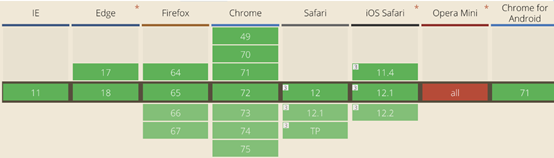 5. 校对文本当你想显示历史编辑及校对的情况时, 示例: 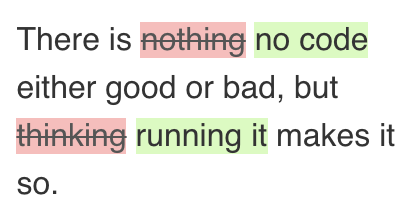 HTML: <blockquote>There is <del>nothing</del> <ins>no code</ins> either good or bad, but <del>thinking</del> <ins>running it</ins> makes it so. </blockquote> CSS: del {text-decoration: line-through; background-color: #fbb; color: #555; } ins { text-decoration: none; background-color: #d4fcbc; } blockquote { padding-left: 15px; line-height: 30px; border-left: 3px solid #d7d7db; font-size: 1rem; background: #eee; width: 200px; } 6.更统一的引号由于中英文引号的不同,使用 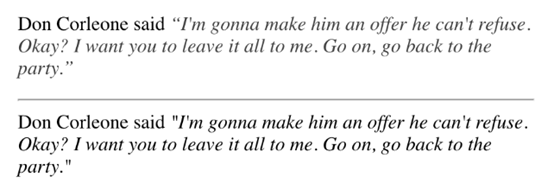 HTML: Don Corleone said <q cite="https://www.imdb.com/title/tt0068646/quotes/qt0361877">I'm gonna make him an offer he can't refuse. Okay? I want you to leave it all to me. Go on, go back to the party.</q></p><hr/> Don Corleone said <i>"I'm gonna make him an offer he can't refuse. Okay? I want you to leave it all to me. Go on, go back to the party."</i> CSS: body {margin: 50px; } q { font-style: italic; color: #000000bf; } 7. 键盘标签
 HTML: <p>I know that <kbd>CTRL</kbd>+<kbd>C</kbd> and <kbd>CTRL</kbd>+<kbd>V</kbd> a are like the most used key combinations</p>CSS: body {margin: 50px; } kbd { display: inline-block; margin: 0 .1em; padding: .1em .6em; font-size: 11px; line-height: 1.4; color: #242729; text-shadow: 0 1px 0 #FFF; background-color: #e1e3e5; border: 1px solid #adb3b9; border-radius: 3px; box-shadow: 0 1px 0 rgba(12,13,14,0.2), 0 0 0 2px #FFF inset; white-space: nowrap; } 8.使用HTML共享代码使用 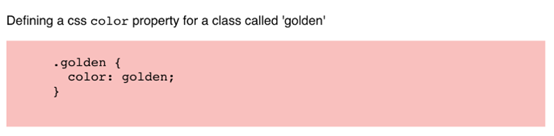 HTML: <figure><figcaption> Defining a css <code>color</code> property for a class called 'golden' </figcaption> <pre> <code> .golden { color: golden; } </code> </pre> </figure> CSS: pre {background-color: #ffbdbd; } 这篇文章也只是抛砖引玉,如果您有更多私藏的使用技巧,不妨也贴出来分享给大家。同时欢迎访问葡萄城的原博客与我交流。 另外,如果您不仅仅限于以上的效率,希望有更完整的动态功能。如:您希望在您的页面中加入Excel功能,不妨尝试纯前端表格控件SpreadJS,相信它能为您的应用增色不少。 原文出处:https://blog.bitsrc.io/pure-html-widgets-for-your-web-application-c9015563af7a |

 万奢网手机版
官网微博:万奢网服务平台